Meeting Icons Set: A Practical Evaluation for Digital Designers
In the realm of digital interface design, visual clarity is paramount. Users navigate complex applications and websites with increasing speed, relying heavily on intuitive graphical cues to understand functionality without reading extensive text. Among the most critical categories of interface elements are those related to communication and collaboration. The Meeting Icons Set represents a specialized collection of vector illustrations designed to address this specific need. This article evaluates the utility, technical specifications, and practical applications of this line-style icon set to help designers and developers determine if it aligns with their project requirements.
Understanding the Meeting Icons Set
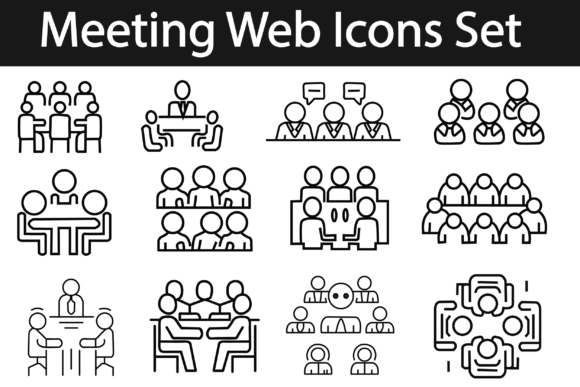
The Meeting Icons Set is a curated library of twelve distinct graphic elements focused on themes of professional interaction, scheduling, and virtual conferencing. Unlike filled or solid icons, these graphics utilize an outline style, also known as line art. This aesthetic choice offers a modern, minimalist appearance that integrates seamlessly into contemporary web and mobile interfaces where whitespace and clean lines are prioritized.
The core value proposition of this set lies in its versatility. The icons are delivered in AI (Adobe Illustrator) and EPS (Encapsulated PostScript) file formats. These are industry-standard vector formats, meaning the graphics are defined by mathematical paths rather than pixels. Consequently, they can be scaled to any size—from a tiny favicon to a large billboard display—without any loss of quality or resolution. This scalability is a fundamental requirement for responsive web design, where icons must adapt to various screen densities and device sizes.
Key Technical Features and Customization
For design professionals, the editability of assets is often more important than the initial design itself. The Meeting Icons Set is marketed as being 100% completely editable. This claim is significant because it allows designers to modify stroke weights, adjust corner radii, or even alter the fundamental shape of the icons to match a specific brand identity.
One of the most practical features highlighted is the ease of color modification. In line-style icons, changing the color is not merely a cosmetic adjustment; it is a functional necessity for indicating state changes, such as hover effects, active states, or disabled modes. Because these files are vector-based, changing the color for printing or digital platform usage is straightforward. Designers can quickly adapt the icons to fit dark mode interfaces, light mode backgrounds, or specific corporate color palettes without needing to recreate the assets from scratch.
The package includes high-quality files that are ready to use immediately after extraction. However, users should note that the files come zipped. This is a standard compression method used to reduce download sizes and keep multiple file types organized. To access the content, users must ensure they have unzipping software such as WinZip or WinRAR installed on their computer or laptop. While this is a minor technical hurdle, it is a necessary step in the workflow for accessing the raw vector data.
Benefits for Web and Application Development
Integrating a pre-made icon set like this offers several strategic advantages over creating custom icons from scratch. First, it ensures visual consistency. When all twelve elements share the same stroke width, corner style, and proportional balance, the user interface feels cohesive and professional. Inconsistent iconography can subtly undermine user trust and make an application appear unfinished.
Second, it accelerates the development timeline. Sourcing individual icons from disparate libraries often results in mismatched styles. By using a unified Meeting Icons Set, teams can bypass the time-consuming process of harmonizing different graphic styles. This efficiency is particularly valuable for startups and agile development teams working under tight deadlines.
Third, the outline style is inherently lightweight. From a technical performance perspective, SVGs derived from these vector files are typically smaller in file size compared to raster images or complex filled icons. This contributes to faster page load times, which is a critical factor for search engine optimization (SEO) and user retention.
Considerations and Tradeoffs
While the benefits are clear, potential users should evaluate certain tradeoffs. The primary limitation of any specialized icon set is scope. With only twelve elements, this set covers common meeting-related scenarios—such as video calls, scheduling, and participant management—but may not cover niche functionalities. If a project requires highly specific icons outside this domain, designers will need to supplement this set with other libraries, which risks breaking visual consistency.
Additionally, the line style, while modern, may not suit every brand aesthetic. Brands that rely on bold, heavy, or playful visuals might find the thin outlines too subtle or delicate. In such cases, a filled icon set or a custom illustration style might be more appropriate. It is crucial to test the legibility of these icons at small sizes, as very thin lines can sometimes disappear on low-resolution screens or when viewed from a distance.
Ideal Use Cases
The Meeting Icons Set is a strong fit for several specific scenarios:
- Corporate Intranets and HR Platforms: These environments often require clear, professional imagery for scheduling meetings, booking conference rooms, and managing team availability.
- Video Conferencing Applications: Startups building niche communication tools can use these icons for standard controls like mute, camera toggle, and screen sharing, provided they customize the colors to match their UI.
- Productivity Dashboards: Project management tools benefit from clean, unobtrusive icons that do not compete with data visualization elements.
- Print Materials: Because the files are vector-based, they are equally suitable for printed agendas, business cards, or promotional flyers where high-resolution output is required.
When to Consider Alternatives
There are situations where this specific set may not be the optimal choice. If a project requires a vast library of hundreds of icons covering diverse categories beyond meetings, a comprehensive UI kit or a subscription-based icon service might offer better long-term value. Similarly, if a brand has strict guidelines requiring unique, hand-drawn, or 3D-style graphics, a generic line-art set will likely fail to meet brand standards.
Furthermore, developers who prefer direct code integration might prefer icon fonts or React component libraries over raw AI/EPS files. While vector files can be converted to SVG code, this adds an extra step to the workflow. Teams with established design systems may already have proprietary icons that cannot be replaced by external assets.
Making the Decision
Choosing the right graphical assets involves balancing quality, cost, and compatibility. The Meeting Icons Set offers a high-quality, editable solution for projects specifically focused on communication and scheduling interfaces. Its vector format ensures longevity and adaptability across digital and print media. However, its limited scope means it is best used as a targeted solution rather than a comprehensive design system.
Before downloading, evaluate your current design language. Does the outline style complement your existing typography and layout? Do you have the technical capability to edit vector files if minor adjustments are needed? If the answer is yes, this set provides a efficient, professional foundation for enhancing user experience in meeting-centric applications. For those seeking a quick, reliable, and customizable visual resource, this collection warrants serious consideration.